




SL500DC Intelligent Control Panel
The control board is only compatible with our gate openers and only match our remote control.
Automatic Close Function: Auto-Close time can be set to 10, 20, 30,40or50 seconds with no automatic close function.
Intelligent Capabilities: Soft start and slow stop function, auto reversal function when meeting obstacle.
| Model | SL500DC | SL800DC |
| power supply | 220v/50Hz;110v/60Hz | 220v/50Hz;110v/60Hz |
| Gate moving speed | 16-18m/min | 16-18m/min |
| Motor power | 150W | 180W |
| Maximum weight of gate | 500KG | 800KG |
| Remote control distace | ≥30m | ≥30m |
| Remot control mode | Single/Three button mode | Single/Three button mode |
| Limit switch | Electronic limit switch | Electronic limit switch |
| Frequency | 433.92 MHz | 433.92 MHz |
| Working temperature | -20°C ~ +70°C | -20°C ~ +70°C |
Direction Sensor
Take right side installation as example (factory default setting)
Working Principle:
The direction sensor is a gadget installed inside the machine, which will be mutually inductive with the magnet installed outside. When the gate is closed, the sensor rod inside the direction sensor is right-biased; when the gate is opened, the sensor rod inside the direction sensor is left-biased. After power failure recovery, the control board can judge the state of the gate through detecting the angle of the direction sensor, when the magnet moves to the position that triggers the direction sensor, the travel limit switch position will be automatically restored.
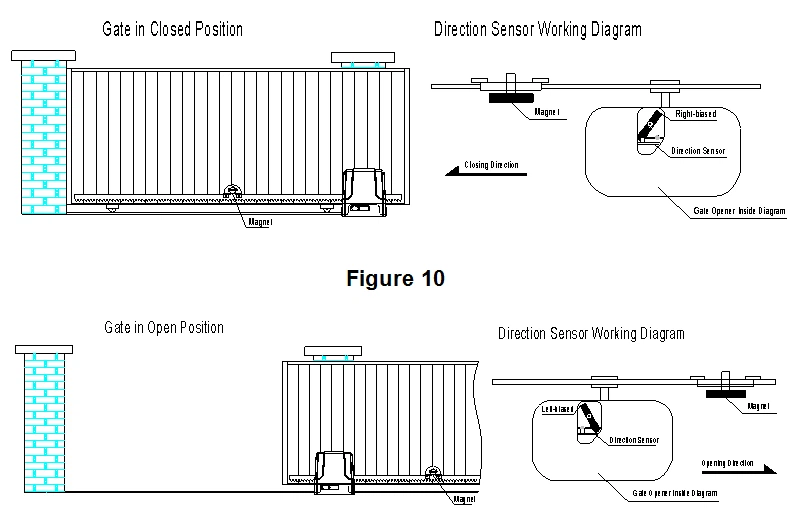
Function Illustration:
1. Direction sensor effectively solves the problem that the gate is offset from its original position after powering off and manual released.
2. Direction sensor can be used as reference point during the opening/closing travel, which can effectively correct the position offset problem during the opening/closing process.

Slow Stop Distance Setting (L4)
Setting for slow stop distance makes the gate running more smoothly and extends the service life of both gate and gate opener.
A. Operation Instruction:
1. Press and hold “PROG” button for 3 sec. to enter into basic menu. à Indicator light L0 will flicker once, and then L1 will be always on.
2. Press “+” button three times to select slow stop distance setting option. à Indicator light L4 will be always on.
3. Press “SET” button once to enter into slow stop distance setting. à Indicator lights L1-L5 will show the current distance of slow stop. (The default is L3)
4. Press “+” or “-” button to set the slow stop distance. à Indicator lights L1-L5 will indicate the different slow stop distance. The more the indicator lights will be on, the longer the distance will be.
5. Press “SET” button once to save and automatically exit. à Indicator lights L1-L5 will be on for one sec.
B. Operation Graphic Illustration

Our Advantages
Our company's strength, re-credit, keep the contract, to ensure product quality, has won the trust of customers under the principles of various categories and low price. Consecutive sales increasement of 14 years. Welcome new and old customers to consult and negotiate.
How to make an order?
The product is in stock: Please make an order directly on this page.
The product is out of stock: Please contact the customer service for the product stock information.
Need a customized product: Please contact the customer service and we will give you a quotation.


Send Inquiry
